Sign In
Sign-Up
Welcome!
Close
Would you like to make this site your homepage? It's fast and easy...
Yes, Please make this my home page!
No Thanks
Don't show this to me again.
Close
Screen Resolution...
To change the screen resolution on a
Macintosh
, follow these steps:
Go up to the
Apple menu
in the top left corner of your screen.
Click and hold and drag down to the
Control Panels
.
Keep your finger on the button and drag across and down to select
Monitors
.
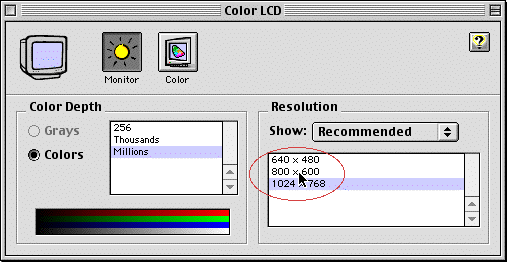
Change the
Resolution
to 800 X 600.
(Page 3 of 4)
Close
|
Back
|
Continue